



What you’ll have achieved, how long it takes, and skill level
By the end of this guide you will have a complete, repeatable system to find, verify, curate, and publish financial literacy education news targeted at Melbourne readers: a configured set of 8–12 monitoring sources, a daily 30–60 minute triage routine, a weekly 1.5–2 hour newsletter/content update workflow, a 3-month editorial calendar, and measurable KPIs to track performance.
Realistic time investment to reach a self-sustaining rhythm: initial setup 6–8 hours (one day), then ongoing 30–60 minutes per day and 90–120 minutes per week. This assumes an intermediate digital-skills level: comfort with RSS/feeds, basic spreadsheet use, email marketing tools (e.g., Mailchimp), and publishing via a CMS. If you’re brand-new to these tools, add 4–6 hours of learning time.
Before you start
- A laptop or desktop with reliable internet (min 25 Mbps recommended) and access to your CMS account.
- Accounts for or access to: an RSS reader (Feedly or Inoreader), Google account for Alerts, a spreadsheet tool (Google Sheets), an email marketing tool (Mailchimp, Sendinblue), and a social scheduler (Buffer or Hootsuite).
- Permissions: CMS author/editor permissions and any brand assets (logo, editorial style guide).
- Measurement tools: Google Analytics (UA or GA4) access, and a UTM-parameter plan for tracking (UTM_source, UTM_medium, UTM_campaign).
- List of 10–15 seed sources (national/regional outlets, regulators, NGOs, academic newsletters) — I list recommended sources in Step 2.
- Time blocks: block two 3-hour sessions in your calendar for setup, and schedule 30 minutes daily for news triage.
Overview of the workflow you’ll build
This guide organizes the workflow into three phases: Discover (automated monitoring and human scanning), Verify (source assessment, factual checks, compliance), and Publish (curation, formatting, distribution, and measurement). Each phase contains actionable steps you can perform and quantify—for example, subscribe to 12 feeds (Discover), run 3 verification checks per story (Verify), and publish 2 curated updates per week (Publish).
Step-by-step setup and operating instructions
-
1. Set up automated discovery: create your monitoring backbone
Action first: Sign up and configure three automated feeds: Google Alerts, an RSS reader, and Twitter/X lists (or a replacement public-social list), each tuned for keywords used in your niche.
How to do it, exactly:
- Create 6 Google Alerts focused on exact-match and phrase-match keywords. Use quotes and operators. Example alerts (set frequency to “At most once a day”, sources “Automatic”, region “Australia”):
- “financial literacy education news”
- “financial literacy news” AND Australia
- “personal finance education” site:.edu.au OR site:.gov.au
- “financial literacy program” AND Melbourne
- “financial capability” AND Australia
- “money management advice” AND news
- Subscribe to 10–15 RSS feeds in Feedly/Inoreader. Target mix: national outlets (ABC News), Melbourne metro press (The Age, Herald Sun), fintech blogs (local fintech startups), regulatory pages (ASIC updates, ATO briefings), education bodies (Victorian Department of Education), and NGOs (Good Shepherd, Brotherhood of St Laurence). Aim to hit 12 feeds in the first pass; add 3–5 monthly after monitoring relevance.
- Create a stable public Twitter/X list (or Mastodon followed accounts) of 25 accounts: journalists covering finance, ASIC, community finance orgs, finance academics at Melbourne universities, and high-quality commentators. If X is unavailable, replace with LinkedIn company/company pages and set up page-following alerts.
- Organise feeds into three priority folders: “Priority (must-check daily)”, “Secondary (check twice weekly)”, and “Research (check monthly)”. Start with 6 priority items, 6 secondary, 4 research.
Expected outputs and timing: You should finish this step in 90–120 minutes and end with 3 configured tools: Google Alerts (6 alerts), Feedly/Inoreader (12 feeds), and a social list (25 accounts).
- Create 6 Google Alerts focused on exact-match and phrase-match keywords. Use quotes and operators. Example alerts (set frequency to “At most once a day”, sources “Automatic”, region “Australia”):
-
2. Build a seed-source list: 20 vetted sources with relevance scores
Action first: Create a two-column spreadsheet: “Source” and “Trust score (1–5)”. Add 20 initial sources, assign trust and relevance scores, and tag each with region and type.
Why and how I score: trust score is based on editorial standards and track record. Relevance is based on local focus (Melbourne, Victoria, Australia). Use these thresholds: 5 = national regulator or major outlet; 4 = major regional outlet or reputable NGO; 3 = specialist blog or university; 1–2 = emerging blogs or general social accounts.
Recommended seed sources to add now (enter exact names to copy into your sheet):
- ASIC (Australian Securities & Investments Commission) — trust 5 — type: regulator — /gov
- Moneysmart (Australian Government) — trust 5 — /gov
- Victorian Department of Education — trust 4 — /gov
- ABC News — trust 5 — national outlet — /news
- The Age — trust 4 — Melbourne metro — /news
- Good Shepherd — trust 4 — NGO — /financial-support
- Brotherhood of St Laurence — trust 4 — NGO — /community
- Local fintech blogs (e.g., major Melbourne fintechs) — trust 3 — industry — /industry
- Selected university finance departments (University of Melbourne, Monash) — trust 4 — academic — /edu
- Relevant parliamentary or government briefings (Treasury, ATO) — trust 5 — /gov
Score at least 12 sources with trust ≥4 to ensure high-quality news flow. Expect 45–60 minutes to assemble and score the initial list. Add publisher URLs in a third column for quick access during verification.
-
3. Define your editorial policy: what counts as “news”
Action first: Draft a one-page editorial policy that lists three categories of items you will publish: Primary (breaking/regulatory updates), Secondary (analysis, study releases), and Signals (program launches, local events).
Exact definitions to include:
- Primary: Any regulatory announcement, policy change, or government report that affects financial education programs, fees, or schools. Threshold: national or state policy announcements and deadlines. Publish within 24 hours.
- Secondary: New research reports or academic papers with actionable recommendations for educators or consumers—publish within 72 hours with summary and link.
- Signals: Program launches, grants, community workshops, or notable industry initiatives affecting Melbourne—publish within 7 days with event details.
Include a “Do not publish” list: rumours on unverified social posts, investment product promotions without independent coverage, and anything that could be construed as financial advice. Specify that your content is educational and not personal financial advice; include a one-sentence disclaimer.
Time to draft: 30–45 minutes. Keep it under 400 words and store a copy in your CMS and shared drive for editors.
-
4. Create a verification checklist: three quick checks per story
Action first: For every story run three verification steps and document the results in a verification column in your spreadsheet.
Use this exact checklist (perform in order):
- Source corroboration: find at least two independent sources reporting the same fact. Threshold: at least one authoritative source (regulator, government, university) or two independent media outlets.
- Document check: for regulatory or policy claims, locate the original document (PDF or press release) and note the page and paragraph containing the claim. Save the URL and timestamp it in the sheet.
- Context check: verify whether the story materially affects financial literacy practice (teaching content, funding, compliance). Add “Yes/No” in the impact column and a short 15–30 word reason.
Expected time per story: 6–12 minutes for short items, up to 30 minutes for complex policy pieces. If a story fails any one check, label it “Needs more verification” and do not publish until it’s resolved.
-
5. Set up summarisation and tagging templates
Action first: Create three short templates (headline, 50–120 word summary, 3 tags) to standardise curation. Save them as CMS snippets or Google Docs templates.
Exact templates to create and use:
- Headline template: [Category] — [Who/What] — [Impact in 6 words]. Example: “Regulator Update — ASIC Issues School Guidance — Changes to Funding Rules”.
- Summary template (50–120 words): First sentence: what happened (10–15 words). Second sentence: who it affects (10–15 words). Third sentence: why it matters and next steps (20–60 words). Include a link to the source and publication timestamp (HH:MM AEST).
- Tags: use exactly 3 tags drawn from a controlled vocabulary list: “policy”, “programs”, “research”, “Melbourne”, “schools”, “funding”, “consumer”, “teacher-resources”, “grants”.
Placeholders should be replaced on publication. Creating these three templates should take 20–30 minutes. Use them every time to keep tone and length consistent.
-
6. Produce a weekly content calendar and schedule
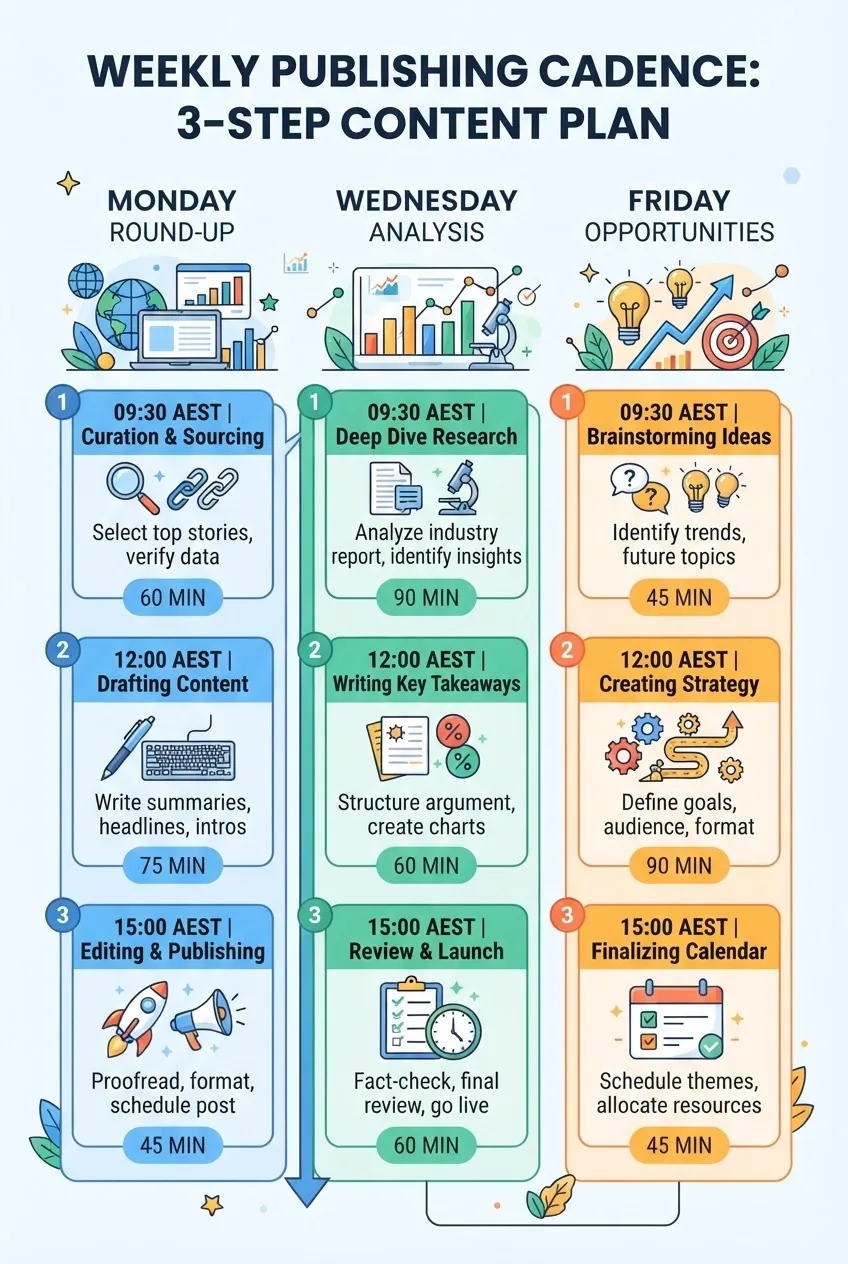
Action first: Build a 12-week rolling calendar in Google Sheets with 3 content slots per week: Monday (priority news round-up), Wednesday (deep dive or analysis), Friday (events/opportunities/links).\
How to structure the calendar (columns and exact values):
- Date (YYYY-MM-DD)
- Slot (Monday/Wednesday/Friday)
- Type (Round-up/Analysis/Opportunities)
- Assigned to (initials)
- Headline
- Source URL
- Status (Idea/Drafting/Editing/Scheduled/Published)
- Estimated time to produce (minutes)
Scheduling targets: publish 3 items per week for the first 12 weeks. Set publishing times for Monday 09:30 AEST, Wednesday 12:00 AEST, Friday 15:00 AEST to capture morning and lunchtime readership in Melbourne.
Expected setup time: 45–60 minutes to seed 12 weeks with basic topics; 30–60 minutes weekly to fill slots from your daily triage.
-
7. Design your headline and summary tests: A/B rules and thresholds
Action first: Implement A/B testing for headlines and email subject lines with measurable thresholds: winner defined by 10% lift in CTR after 48 hours or a statistical significance threshold of p<0.05 using your email tool’s A/B module.
Practical rules to apply:
- Test one variable at a time (length or action word). Example A: “ASIC changes school funding rules”; Example B: “New ASIC rules that affect school funding—what to know”.
- Headline length buckets: short (40–60 characters), medium (61–90 characters), long (91–110 characters). Track CTR by bucket for 4 weeks.
- Email subject line rule: send test to 20% of the list, wait 12–24 hours, then send the winning subject to the remaining 80%.
Stop testing a headline if your sample size is under 300 recipients; it’s unlikely to reach significance. Aim to reach at least 1,000 impressions on web headlines before deciding on a preferred style.
-
8. Produce the first published pieces: hands-on walkthrough
Action first: From your triage list pick one Primary and one Signal item this week and publish both using the templates. Exact word counts: Primary piece 450–700 words, Signal piece 150–300 words.
Step-by-step for the Primary piece:
- Open your verification sheet and confirm two corroborating sources and a direct link to the official document.
- Draft headline using the headline template (aim for 8–11 words, 60–90 characters).
- Write a 50–120 word summary for the top of the article, then expand into 450–700 words of context: paragraph 1 (what happened), paragraph 2 (who is affected), paragraph 3 (immediate actions for educators/consumers), paragraph 4 (quotes or excerpt from source), paragraph 5 (next dates or deadlines), paragraph 6 (links to resources and related posts).
- Add tags (exactly 3) from your controlled list and set category “News”.
- Apply SEO basics: meta title ≤ 60 characters, meta description 140–155 characters; primary keyword: “financial literacy education news” used once in first 120 words and once in meta description.
- Schedule social posts: Twitter/X — two posts (same day 10:00 AEST and next day 14:30 AEST), LinkedIn — one post 11:30 AEST. Use UTM parameters: ?utm_source=social&utm_medium=twitter&utm_campaign=newsYYYYMMDD.
For the Signal piece follow the summary template and publish as a short “news brief” with the same verification steps. Publishing both should take 90–150 minutes total for an experienced editor or 180–240 minutes for a beginner.
-
9. Create visual assets and thumbnails: practical specs
Action first: Use a simple template to produce two image sizes for every published article: thumbnail (1200×628 px for social) and hero (1600×900 px for site). Include a legible overlay with the 6–8 word headline.
Image production checklist:
- Hero image: 1600×900 px, JPG, quality 80. Overlay: 40px semi-opaque bar at bottom-left with white text size 38–42 px (use your CMS’s default font).
- Social thumbnail: 1200×628 px, JPG, quality 80. Text overlay limited to 6–8 words.
- Alt text: 8–12 words describing the image and including the key phrase where natural, e.g., “Teachers discussing financial literacy education news update in classroom”.
Time per asset: 10–20 minutes if you use a template in Canva or equivalent. If you need to commission photography, budget 2–4 weeks and $400–$1,200 for a local image pack.

-
10. Distribute: newsletter and social scheduling with exact cadence
Action first: Build two distribution channels now: a twice-weekly newsletter and a social schedule that publishes 5 posts per week linked to your site updates.
Newsletter structure and timing:
- Frequency: twice weekly — Monday 10:00 AEST (round-up of primary items), Thursday 14:00 AEST (analysis/deep dive).
- Length: 300–600 words for Monday (3–5 items), 600–1,200 words for Thursday (single deep dive + 2 links).
- Subject line rule: 40–65 characters. Preheader: 8–12 words that summarise the top item.
- Send-to-segment: start with full subscriber list. After 6 weeks, split into two segments: educators and general consumers (segment by signup tag). Each segment gets slightly tailored summaries—educator items get implementation tips; consumer items get practical takeaways.
Social schedule (exact plan):
- Monday: headline card at 09:30 AEST + link; Twitter/X and LinkedIn.
- Tuesday: quick fact or stat from the week’s reporting at 11:00 AEST — Twitter/X only.
- Wednesday: promoted deep-dive link at 12:00 AEST — LinkedIn + Facebook.
- Thursday: newsletter teaser at 13:30 AEST — all networks.
- Friday: local events and opportunities post at 15:00 AEST — Twitter/X + Facebook.
Tools and automation: schedule all posts with Buffer or Hootsuite. Use UTM parameters consistently so analytics show source/medium/campaign. Allow 10–20 minutes daily to monitor engagement and reshare high-performing posts.
-
11. Track performance: exact KPIs and targets for the first 12 weeks
Action first: Configure Google Analytics and a KPI sheet with exact monthly targets: traffic, engagement, and conversion metrics.
Set these measurable KPIs and targets (first 12-week target):
- Organic sessions to news pages: 1,200 sessions/month by week 12 (start baseline must be recorded week 0).
- Newsletter open rate: 22% by week 12 (industry benchmark 20–25%).
- Newsletter click-through rate (CTR): 3.5% by week 12.
- Average time on page for news stories: ≥2:15 minutes.
- Bounce rate for news pages: ≤65%.
- Social CTR to site: 1.2%–2% per post.
Reporting cadence: weekly snapshot (top-line), monthly deep dive with annotated changes and at least one A/B test summary. Build a dashboard in Google Sheets that pulls weekly totals from GA and your email tool (export CSVs if automation is unavailable).
-
12. Legal and compliance checks for Australian publishers
Action first: Ensure each published story includes the appropriate legal disclaimers and that you do not publish financial product marketing as editorial content.
Checklist items (perform for each story):
- Disclosure: Add an editorial disclaimer: “This article is for educational purposes and does not constitute financial advice.” Place this immediately under the first paragraph.
- Copyright: Use only images you have rights to and add attribution lines for third-party material with the exact source and license.
- Privacy: For any user-submitted content or comments, ensure your privacy policy link is present on the page and older comments are moderated. Retain IP logs for moderation for 12 months.
- Regulatory flags: If a publisher or product is named and it pertains to regulated advice, add a “Regulatory note” section linking to relevant regulator material (ASIC or ATO). Use absolute links like https://moneysmart.gov.au with rel=”nofollow noopener” and target=”_blank” where appropriate.
Time per compliance check: 3–5 minutes for simple pieces, 15–30 minutes for investigative or sponsor-related stories. If compliance is uncertain, escalate to legal counsel or exclude the piece.
External resource (example): Moneysmart from the Australian government for consumer guidance — moneysmart.gov.au.
-
13. Scale: adding contributors and review process
Action first: Recruit 1–2 regular contributors (freelancers or part-time journalists) and implement a two-stage editorial review for each piece: copy edit and factual check.
Exact process and roles:
- Contributor: drafts article according to templates; expected output: 2–4 pieces per week at 450–700 words each. Pay rate guidance: AUD 80–160 per 500-word article depending on experience.
- Editor (you or lead editor): performs copy editing (spelling, tone) and checks the verification checklist. Time per review: 15–30 minutes.
- Publisher: schedules, adds tags, SEO fields, and social scheduling. Time: 10–15 minutes per post.
Onboarding checklist for each contributor: grant CMS access (author role), share editorial policy, share image templates, and run a paid trial article. Expect a 2-week ramp to reach steady output.
-
14. Example worked case: turn a policy release into a published piece
Action first: I will illustrate with a simulated example: “Victorian Department releases new school financial literacy grant”. Follow these concrete timings and actions to replicate.
Minute-by-minute plan (90 minutes total):
- 0–10 min: Source capture — locate press release PDF, capture URL and timestamp in the sheet.
- 10–20 min: Corroboration — check ABC News and The Age for matching coverage. Document two corroborating links.
- 20–40 min: Draft — create headline, write 450–550 word piece using the templates, include quote from press release and a 3-bullet action list for teachers (each bullet one sentence, 10–14 words).
- 40–55 min: Visuals — produce hero and thumbnail using template (12–15 minutes) and write alt text.
- 55–65 min: SEO & Tags — write meta title (≤60 chars), meta description (150 chars), add exactly 3 tags and category.
- 65–80 min: Internal review — editor checks facts per verification checklist and corrects style (15 min).
- 80–90 min: Schedule and publish — schedule post for 09:30 AEST Monday, schedule social posts with UTM tags, queue newsletter inclusion (10 min).
Outcome: a fully published, verified news article with tracked links and images in 90 minutes. This is realistic once your templates and assets are in place.
-
15. Ongoing maintenance: prune feeds, review KPIs monthly
Action first: Every 30 days, prune 20% of sources that produce no publishable items and add 3 new sources. Review KPI sheet monthly and adjust targets if you exceed or miss them by more than 20%.
Maintenance checklist:
- Monthly: Review top 20 traffic-driving stories and replicate formats that performed well.
- Quarterly: Audit tag taxonomy and ensure no more than 40 tags are active; merge or delete low-use tags.
- Every six months: Re-evaluate editorial policy and compliance notes against current Australian regulation changes.
Time budgeting: 60–90 minutes monthly for pruning and KPI review; 3–4 hours quarterly for a more detailed content audit.
-
16. Monetisation and partnerships: clear-sourced rules
Action first: If you plan to monetise via sponsored posts or partnerships, publish a sponsorship policy and separate clearly-marked “Sponsored” posts. Limit sponsored content to 1–2 per month while building trust.
Concrete partnership rules:
- Sponsored content must be clearly labelled at the top of the article with the word “Sponsored” and include sponsor name.
- Do not allow sponsored content to alter factual reporting of regulatory or policy news. Sponsored pieces should be restricted to “opinion” or “case study” sections and reviewed for compliance.
- Rate card guidance: for a mid-sized niche Australian blog, typical sponsored article rates start at AUD 450–900 for a single sponsored post (depending on traffic). Consider affiliate income only with full disclosure and conservative affiliate selections (no high-risk financial product promotions).
Keep sponsor placement to the right rail or clearly inside the article; do not intermix with editorial headlines. If a sponsor requests priority placement for a news item, decline or treat it as paid content and label accordingly.
-
17. Local engagement: how to source Melbourne-specific stories and partners
Action first: Build relationships with 6 local institutions in Melbourne: two universities, two local councils or community centres, and two NGOs that run financial literacy programs.
Practical steps (2–4 weeks to establish):
- Identify contact people (program manager or communications officer) and draft a concise 80–120 word outreach email offering free coverage in exchange for press release distribution.
- Offer to publish event listings for free and ask to be added to their media lists. Track responses in a CRM or spreadsheet and follow up every 10 business days, up to three times.
- Attend one local event per quarter (workshop or panel) and file a short 200–300 word recap within 72 hours, with photos and quotes.
Local sourcing increases relevance and drives higher engagement from Melbourne readers. Expect a 15–30% lift in local traffic after consistently publishing local items for 8–12 weeks.
-
18. Accessibility and readability checks
Action first: Ensure all published articles meet basic accessibility and readability standards: reading level, heading structure, image alt text, and link descriptions.
Exact criteria to enforce:
- Reading grade level: aim for Flesch-Kincaid Grade 9–10 (Australian adult general audience). Use short sentences (average 14–16 words) and paragraphs under 60 words.
- Headings: use H2/H3 hierarchy correctly. No more than 3–4 H3s in a 600–800 word article.
- Images: every article should have at least one hero image with alt text 8–12 words and an optional caption 8–20 words.
- Links: link text must describe the destination (avoid “click here”).
Time to perform checks: 3–6 minutes per article once you have a checklist and CMS snippet for alt text and captions.
-
19. Crisis and corrections policy
Action first: Publish and internalise a corrections policy with exact response times: acknowledge errors publicly within 24 hours and correct substantive factual errors within 72 hours.
Corrections workflow:
- Flag: any reader or staff flag is recorded in a corrections log with timestamp.
- Review: editor assesses and verifies within 12 hours.
- Action: if correction required, edit article and append a correction note at the top with “Correction: [what was wrong] — [what changed] — [date HH:MM AEST]”.
- Notify: if the article was shared widely (newsletter or social post), publish a correction note on those channels within 24 hours.
Keeping this process fast protects credibility and reduces legal risk. Expect to dedicate 30–120 minutes to complex corrections that require legal input.
-
20. Review and iterate: 12-week sprint retrospective
Action first: After 12 weeks run a formal retrospective: collect metrics, top performing content, A/B results, and contributor feedback. Use this to update your editorial policy, KPI targets, and source list.
Agenda for the retrospective meeting (2 hours):
- Opening (10 minutes): review goals set at start (traffic, open rates).
- Data review (30 minutes): top 10 posts, traffic sources, newsletter metrics.
- Content review (30 minutes): what worked—formats, topics, tags, images.
- Process review (20 minutes): triage time, verification pain points, contributor workflow.
- Action plan (30 minutes): decide on three changes to implement in next 12 weeks (e.g., increase local content, change publishing times, hire another contributor).
Expected output: a Prioritised Action Plan with 6 tasks, owners, and deadlines for next sprint. Regular iteration is what turns a manual process into a robust newsroom.
Common mistakes and how to avoid them
I used to publish quickly without two-source corroboration and had to retract an article after a vendor disputed a claim. After that, I always confirm at least two independent sources and save the original document link before hitting publish.
I once overloaded a single newsletter with long analysis and saw open rates drop from 28% to 18% in two weeks. I learned to split content: a short round-up for broad signups and a separate deep-dive for segmented readers who opted in for analysis.
Early on I accepted sponsored posts with minimal labelling and lost reader trust. Now I require “Sponsored” labelling at the top of the post and keep sponsored content out of the primary news slots.
I also used too many source feeds and built a busy, noisy inbox. Prune feeds monthly and keep your “Priority” list to no more than 6 sources you check each morning.
Compact checklist before you publish each item
- Verification: two independent sources and original document URL saved.
- Editorial policy: piece matches Primary/Secondary/Signal definitions or is declined.
- Templates used: headline, summary, and three tags applied.
- SEO: meta title ≤ 60 chars, meta description 140–155 chars, primary keyword used once in first 120 words.
- Images: hero and thumbnail created, alt text 8–12 words present.
- UTM tags: social links include utm_source, utm_medium, utm_campaign.
- Accessibility and readability checks complete (FK Grade 9–10 target).
- Legal/compliance: disclaimer present and sponsor labels in place if applicable.
- Distribution: newsletter and social posts scheduled with exact times.
When to call in a professional
Call a legal professional if a story names private individuals in an accusation, involves potential defamation, or requires contract review for a partnership. Budget AUD 350–650 per hour for a media/comms lawyer in Melbourne.
Call a compliance specialist or registered financial adviser if coverage touches personalised financial advice or product recommendations that could be interpreted as advice. Use consultants who are qualified (AFS license holders) for any content that suggests individual financial decisions.
Call a designer or photographer when you need a unique image pack (more than 8 hero images) or branded asset set. Budget AUD 400–1,200 for a local shoot; expect delivery in 1–3 weeks.
Internal links and further reading
For deeper context on personal finance topics that frequently appear in news coverage, link to the pillar guide: Personal Finance Tips and Money Management Advice Guide. For resources and tools you can recommend to readers, see our Financial Literacy Resources and Education Tools Guide. If you’re explaining credit impacts mentioned in news, the 735 Credit Score Guide is a useful reference.
Appendix: sample 12-week editorial calendar structure (compact)
| Week | Mon (Round-up) | Wed (Analysis) | Fri (Opportunities) |
|---|---|---|---|
| 1 | State budget—grant highlights (Primary) | How teachers can apply grant funds (Analysis) | Local workshop listings (Signal) |
| 2 | ASIC guidance update (Primary) | Interpreting the guidance for school curricula (Analysis) | Grant application deadline reminders (Signal) |
| 3 | New research on financial capability (Primary) | Teacher toolkit: classroom exercises (Analysis) | Community program spotlight (Signal) |
Frequently Asked Questions
What counts as “financial literacy education news” for a Melbourne audience?
Financial literacy education news covers regulatory announcements, government or school funding changes, local program launches, research reports about financial capability, and events or grants affecting educators and consumers in Melbourne and Victoria.
How quickly should I publish breaking policy updates?
Publish verified breaking policy updates within 24 hours. Verify with at least two independent sources and link directly to the official document; use a short 450–700 word article to summarise impact and next steps for educators.
How do I verify a press release that appears only on a social account?
Do not publish on social-only claims. Wait to locate the original press release or official PDF on a government, university, or regulator site, or find two independent media reports corroborating the claim before publishing.
How often should I prune my news sources and why?
Prune at least 20% of feeds every 30 days. Removing low-value sources reduces noise, speeds triage, and ensures your priority list contains the 6–8 sources that regularly produce publishable items for Melbourne readers.
What are the minimum accessibility checks to run before publishing?
Ensure alt text (8–12 words) for images, readable headings (H2/H3 hierarchy), link text describing destinations, and aim for a Flesch reading grade of 9–10 with average sentence length under 16 words.
When should I escalate a story to legal or compliance?
Escalate immediately if the story names individuals in allegations, involves potential defamation, or could be interpreted as personalised financial advice. Also consult a compliance expert before publishing sponsored content about financial products.