



What you’ll achieve, how long it takes, and who this guide assumes you are
By the end of this hands-on guide you will have chosen, organised and tested a set of financial literacy resources and a 6-to-8 week learning plan tailored for a Melbourne audience (secondary students, adult learners or community groups). You will be able to: identify reliable resources, map them to learning objectives, deliver or assign materials, track learning outcomes using measurable metrics, and create a repeatable template for future classes.
Realistic time commitment: 8–16 hours to plan and curate resources and build the learning plan; 6–8 weeks to run a short course or 3–6 months to embed a sustained self-study programme. This guide assumes you have intermediate digital skills (comfortable with Google Sheets or Excel, basic LMS or Google Classroom use, and uploading/curating web links) and basic instructional design knowledge (writing learning objectives, sequencing lessons).
Before you start
- Primary device: laptop or desktop (recommended) with internet access — target minimum 25 Mbps download for group video activities.
- Spreadsheet software: Google Sheets or Microsoft Excel.
- Document editor: Google Docs or Microsoft Word.
- Presentation tool: Google Slides, PowerPoint or Canva (free account).
- Budget for paid tools (optional): $0–$200 AUD depending on chosen paid courses or guest speaker fees.
- Access to a classroom or webinar platform: Zoom, Microsoft Teams, or Google Meet (Zoom Basic is free for <40-minute sessions; upgrade to Zoom Pro ~$22 AUD/month for uninterrupted 60–90 minute classes).
- Printed materials (optional): A4 handouts (print 1 per participant), stapler and highlighter pens.
- Time blocks: allocate 2-hour planning sessions across 4–8 days, plus 30–60 minutes per weekly delivery session for prep.
How to use this guide
Follow the numbered steps in order. Each step is action-first: start with the bold line, then read the details and complete the tasks listed. Where a step requires concrete settings, I provide exact numbers, recommended durations, templates and worked examples. If a step is a longer procedure you’ll find it broken into sub-steps and a short checklist.
Step-by-step plan (core procedure)
-
Define the learner profile and measurable objectives.
Spend 60–90 minutes interviewing stakeholders or running a one-page intake form with your learners. Capture: age range (e.g., 16–18, 25–45), current employment status, average household income range (provide bands: <$40k, $40–80k, $80–150k, >$150k), and baseline knowledge (self-rated 1–5 across budgeting, credit, saving, investing). Translate needs into 3–5 measurable learning objectives. Example objectives:
- By week 6, 80% of participants will create and maintain a monthly budget using the provided spreadsheet template.
- By the end of the course, at least 70% can calculate interest on a loan using both simple and compound formulas and explain the difference.
- Within 8 weeks, 60% of learners will identify three reputable financial information sources and explain why they are trustworthy.
Record objectives in a single Google Doc: title it “Learner Profile + Objectives” and share with collaborators with comment-only access for feedback.
-
Audit existing resources (45–90 minutes).
Create a three-column spreadsheet in Google Sheets titled “Resource Audit”. Columns: Resource Name, Type (video/course/article/tool), License/Cost (Free/Paid $X AUD), Link, Matches Objective (list objective numbers), Time to Complete (minutes), Quality rating (1–5). Populate at least 20 candidate items from local and global sources.
Recommended categories and example targets for a 20-item audit:
- Free interactive courses (aim for 4–6 items) — e.g., government modules or Khan Academy equivalents.
- Short videos (5–10 minutes each) for microlearning (6–8 items).
- Tools & calculators (3–4 items) — budget spreadsheets, compound interest calculators.
- Articles and explainers (4–6 items) — concise, authoritative write-ups.
- Local organisations (2–3 items) offering in-person workshops or printed resources.
Rate each candidate using these thresholds: Quality rating 4–5 for evidence-based content, accurate examples, current to within 3 years; Cost rating: Free = 0, paid under $50 = 1, $50–$200 = 2, >$200 = 3 (note budget impact).
-
Choose a delivery format and timeline (2–4 hours).
Decide whether you will run: an instructor-led course (live sessions), a blended course (mixed live and self-study), or a self-study pack. Use these concrete rules when choosing:
- If participants’ average available time is <3 hours/week, choose self-study or 4 x 45-minute live sessions.
- If you need higher completion rates (>70%), choose instructor-led weekly sessions of 60–90 minutes for 6–8 weeks.
- If the group is mixed ages and needs personalised help, plan for 1:10 tutor-to-student ratio in live sessions or add 30-minute weekly office hours.
Example timelines:
- Compact workshop: 3 sessions of 2 hours over 3 weeks (recommended for adults with time constraints).
- Standard course: 8 weekly sessions of 75 minutes + 30 minutes homework → total learner time ~12 hours.
- Self-study pack: 6 modules released weekly, each module 60–90 minutes of content + optional tasks.
-
Select and map resources to objectives (2–3 hours).
Open your “Resource Audit” spreadsheet and create a new tab “Course Map”. For each objective, list 3 supporting resources: one core resource (course or article), one practice tool (calculator or spreadsheet), and one assessment item (quiz or case study).
Use exact match rules: an objective that requires practical skill (e.g., create a budget) must include at least one downloadable spreadsheet (time to complete: 30–60 minutes) and one short video (5–10 minutes) demonstrating step-by-step use. Mark each chosen resource with expected learner time in minutes and estimated classroom time if used live.
Example mapping for Objective 1 (budget):
- Core: “Monthly budget template with categories” — Spreadsheet, Download size: ~60KB, Completion time: 45 minutes (including customization).
- Practice: “30-minute guided budget exercise” — Video + worksheet, Time: 30 minutes.
- Assessment: “Submit a one-page budget snapshot” — Instructor assesses against rubric (rubric defined below).
-
Create learning materials and a reproducible lesson template (3–6 hours).
Write a lesson template that you will reuse for every session. Template time allocation (for a 75-minute class):
- 5 minutes — Welcome and learning objective recap.
- 10 minutes — Quick pre-quiz (3 multiple choice questions) to assess retention.
- 25 minutes — Core instruction (video demonstration + guided walk-through).
- 20 minutes — Hands-on activity or case study (individual or pair).
- 10 minutes — Review, Q&A and assignment of homework (linked resources).
- 5 minutes — Feedback survey (1–2 Likert questions about clarity and pace).
Create these documents (one Google Doc per lesson) and a slide deck with no more than 10 slides per session. Use 1–2 worked examples per lesson with concrete numbers: for example, when teaching compound interest, show principal $1,000 AUD, annual rate 5%, compounded monthly for 5 years, and calculate both final balance and total interest.
Worked example (compound interest): Principal P = $1,000, r = 5% (0.05), n = 12 (monthly), t = 5 years. Formula A = P(1 + r/n)^(n*t) = 1000*(1 + 0.05/12)^(60) = 1000*(1.0041667)^(60) ≈ $1,283.36. Total interest ≈ $283.36. Include the calculation as a prepared slide and an editable spreadsheet cell so participants can plug in other numbers.
-
Build simple assessments and a marking rubric (90–120 minutes).
Create two forms of assessment per objective: a short quiz (5–10 questions) and a practical task. Quizzes should be auto-graded where possible (Google Forms or LMS quiz). Practical tasks use a 4-point rubric: 4 = meets all criteria and shows insight; 3 = meets criteria with minor errors; 2 = partial; 1 = insufficient.
Example rubric for a submitted monthly budget (max 16 points):
- Completeness (0–4): All income and expense categories present, totals match.
- Accuracy (0–4): Calculations correct, no negative balances unless noted.
- Prioritisation (0–4): Essential expenses separated from discretionary categories.
- Reflection & plan (0–4): Learner provides 2 realistic changes to reduce deficit or increase savings.
Pass threshold: 12/16 points (75%). Use the rubric consistently; store marks in a “Learner Tracker” sheet with anonymised IDs if privacy is a concern. Plan to spend 10–15 minutes per practical submission to mark and give feedback.
-
Set up delivery logistics and communications (2–4 hours).
Decide communication channels and frequency. Use these precise rules:
- Weekly live course: send a reminder email 48 hours before and 90 minutes before each session; include the session agenda and a one-click calendar attachment (.ics). Use a standard subject line: “Week X: [Course Title] — Key task and link”.
- Self-study course: send a module release email every Monday at 9:00 AM local time with a checklist of tasks expected to take 60–90 minutes.
- For community groups: post a 150–200 word summary of each session in a shared Google Doc within 24 hours of delivery.
Create a single URL hub to host all resources using a simple Google Site, a course page in an LMS, or a public Google Drive folder. Structure it: /Week-1/, /Week-2/, etc. Ensure each folder contains: session slides (PDF), homework sheet (PDF), budget templates (Excel/Google Sheets), and quiz link.
-
Test resources with a pilot group and collect timing data (1–2 sessions).
Run two pilot sessions with 5–8 representative learners. During pilots, time every activity with a stopwatch and record actual completion times in minutes. Compare planned vs actual times and adjust:
- If core instruction runs >15% longer than planned, break the content into two modules.
- If practical tasks regularly finish >20 minutes early, add a stretch task or deeper example.
Collect immediate pilot feedback: 3 quick questions (5-point scale) on clarity, pace and usefulness, and one open-text improvement suggestion. Aim for an average rating ≥4/5 before launching to a larger cohort.

-
Launch the course and enforce a simple engagement policy (ongoing during delivery).
On launch day, send a “Welcome pack” email that includes:
- Course schedule with dates and times in local Melbourne timezone (AEST/AEDT as applicable), e.g., “Weekly sessions: Wednesdays 6:30–7:45 PM AEST, starting 7 Oct”.
- Access links and a short technical checklist: verify microphone and camera 10 minutes before start, test spreadsheet downloads.
- Rules for participation: arrive within first 10 minutes, submit homework within 7 days of session, notify facilitator if missing. Missing two consecutive sessions without notice = removed from the active cohort (but can rejoin as self-study).
Track attendance with a simple register in Google Sheets: columns for date, learner ID, attended (Y/N), homework submitted (Y/N). Set an engagement target: 75% average attendance across the live sessions.
-
Run weekly assessments and provide timed feedback (ongoing; 1–2 hours per week instructor time per 10 learners).
Schedule marking blocks: block two 60-minute sessions per week to review practical tasks, return feedback and update the Learner Tracker. Use the 24–72 hour feedback window standard: aim to return graded practical tasks within 72 hours (3 days) with three actionable points: one praise, one correction, one next-step.
Automate quiz marking and send immediate quiz scores. For practical assessments, provide a standardised feedback template. Example template content (3 lines): “Well done: X. Correction: Y (see rubric criterion 2). Next step: Try Z and re-submit by [date] if you want further review.”
-
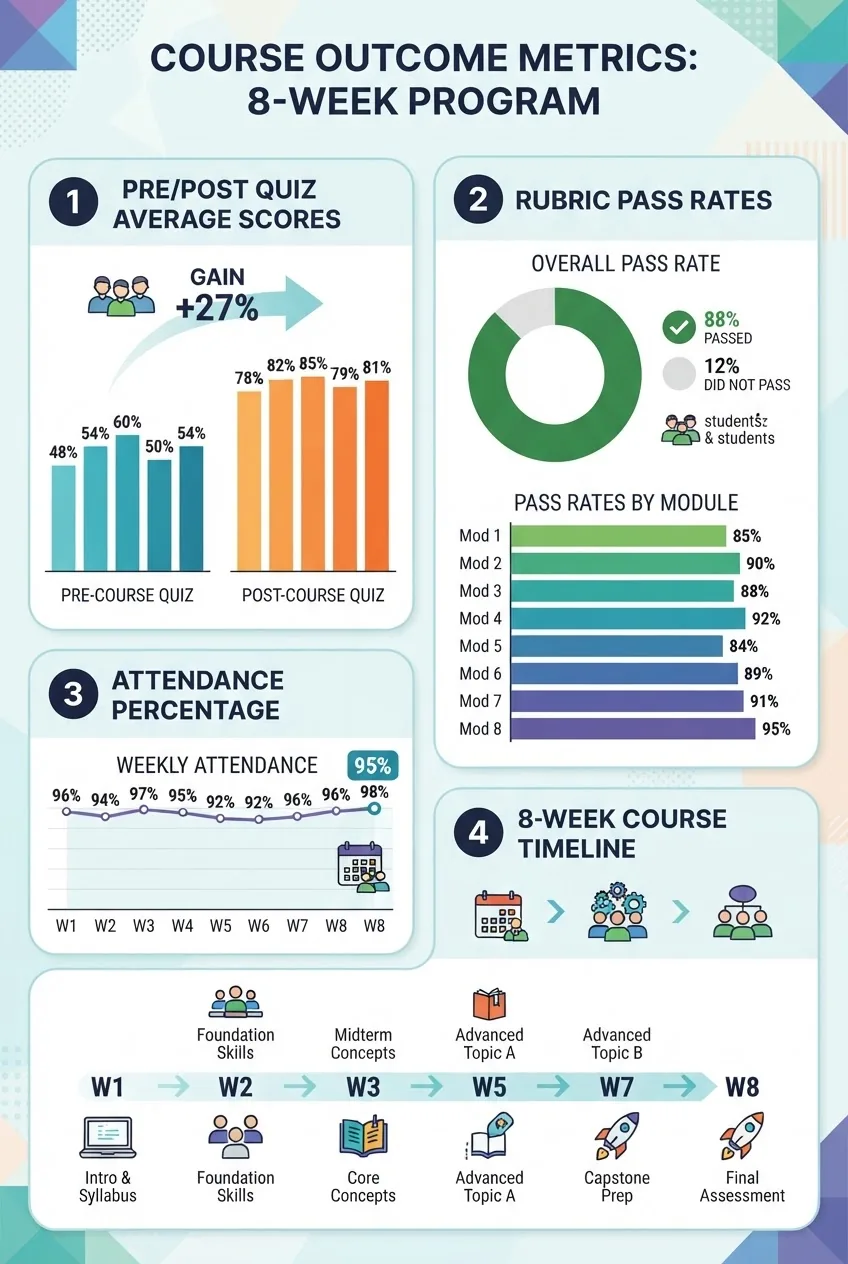
Measure outcomes with simple metrics and a pre/post test (planning 2 hours, analysis 2–4 hours).
Collect baseline and endline data using the same 15-question multiple choice quiz and two practical tasks (budget and interest calculation). Measure:
- Knowledge gain = (average post-quiz score – average pre-quiz score). Set target: ≥25 percentage point improvement.
- Practical success rate = % of learners meeting rubric pass threshold (≥75%). Target: ≥70%.
- Behaviour change proxy: % of learners who commit to a saving target by week 8 (e.g., set aside $50 per fortnight). Target: ≥40% among adult cohorts.
Report results in a short outcomes dashboard (single Google Sheet tab) with charts. Use clear thresholds: Green = meets target, Amber = within 10 percentage points, Red = below target. Present results to stakeholders in a 10-minute debrief.
-
Iterate: update content, prune low-performing resources and scale (2–6 hours depending on changes).
After the first cohort, review resources with this decision rule: remove any resource with quality rating ≤3 that matched an objective where <60% of learners passed. Replace it with two candidates from your original audit and re-pilot with a small group of 3 learners for 60 minutes.
For scaling:
- To double capacity, train one co-facilitator for every 12 learners; provide a 4-hour train-the-trainer session using the lesson template and marking rubric.
- For public distribution, package the course as a self-study pack: create 6 module PDFs, one zipped folder with templates, and a “facilitator guide” (6 pages) and price as Free or pay-what-you-can to maximise access.
-
Document the full process and prepare a replication kit (3–5 hours).
Pack everything into two folders: “Learner Pack” (student-facing) and “Facilitator Pack” (internal). Facilitator Pack must include: lesson templates, rubrics, sample feedback, a 6-step troubleshooting list for tech issues, and the “Audit” spreadsheet. The Learner Pack includes clear timelines: e.g., “Week 1: Budget basics — total time 90 minutes (1 live + 30 min homework)”. Add a 1-page privacy notice explaining how learner data is used and kept for up to 12 months only.
Worked example: 8-week course plan for a mixed adult cohort (detailed)
This worked example translates the steps above into a practical schedule for a small community adult cohort (12 learners) meeting weekly for 75 minutes.
Course title and structure
Title: “Everyday Money Skills — 8 Weeks”. Live sessions: Wednesdays 6:30–7:45 PM AEST. Total live time: 10 hours; estimated learner homework time: 6 hours. Total learner time: 16 hours.
Weekly plan with specific content and times
-
Week 1 — Budgeting fundamentals (75 minutes).
Pre-work: 10-minute pre-quiz. Live: 10-minute intro; 30-minute walk-through of downloadable budget spreadsheet (45 minutes practice if done in-class); 20-minute case study where learners customise categories for a sample household earning $55,000/year. Homework: submit monthly budget snapshot by Sunday (45 minutes).
-
Week 2 — Short-term saving and emergency funds (75 minutes).
Teach the “50/30/20” budgeting method with concrete figures: example household income $4,000/month net => needs $2,000, wants $1,200, savings $800. Task: create a 3-month saving plan to build a $2,400 emergency fund at $200/month contributions.
-
Week 3 — Debt basics and credit scores (75 minutes).
Explain difference between secured vs unsecured debt; show a worked example of credit card interest: outstanding $2,000, rate 19.99% APR, minimum monthly payment 2% or $50; show interest accrual month-by-month for 12 months. Homework: calculate interest and propose a repayment plan to halve the balance in 12 months.
Link to deeper reading about credit score ranges and repair: 735 Credit Score Guide with Range and Good Credit Info.
-
Week 4 — Banking, accounts, and fraud awareness (75 minutes).
Compare transaction accounts, savings accounts and term deposits with example rates: transaction account 0.05% variable; high-yield savings 1.25% APY; 12-month term deposit 2.1% fixed. Teach two red flags for scams: pressure to act immediately; requests for OTP codes. Homework: review bank statements for one month and identify three improvement opportunities.
-
Week 5 — Investing basics for beginners (75 minutes).
Teach risk, return and diversification with concrete examples: investing $500/month into an index fund with 7% annual return projected over 10 years results in future value ~ $500 * [ (1+0.07)^10 -1 ] / 0.07 ≈ $81,000? (Note: ensure spreadsheet formula provided). Discuss investment account types and link to an overview: Investment Accounts for Beginners Guide.
-
Week 6 — Taxes, superannuation and government payments (75 minutes).
Explain basics of Australian PAYG tax with a simple bracketed example: taxable income $60,000 => approximate tax (use current rates at time of delivery), and superannuation employer contribution (SG) at 11% (verify current rate). Provide step-by-step instructions to check super balance and nominate beneficiaries where required.
-
Week 7 — Planning for medium-term goals and calculators (75 minutes).
Use a goal-planning worksheet: target $5,000 holiday in 18 months => required monthly saving $277 (5000/(18) = 277.78). Show how to adjust saving targets with small recurring changes: $30/week => $120/month, recalculate timeline in the spreadsheet.
-
Week 8 — Review, present practical work and next steps (75 minutes).
Present selected budgets and savings plans, run final post-quiz, and deliver certificates of completion (digital badges). Collect course evaluation survey (10 questions) and call for volunteer peer mentors for future cohorts.
Tools, templates and recommended free resources (concrete list)
Here are named tools and exact templates to use. Where fees apply I provide cost ranges in AUD (as of guide publication). Verify pricing before purchase.
| Resource type | Suggested item | Why use it / cost |
|---|---|---|
| Budget spreadsheet | Customisable Google Sheets template (monthly tab + annual tab) | Free; editable; quick to duplicate for each learner. |
| Compound interest calculator | Embedded spreadsheet calculator; formula prefilled | Free; use for worked examples and homework. |
| Short explainer videos | 3–8 minute videos covering single topics (budgeting, interest) | Free where possible; keep each <10 minutes to maintain attention. |
| Quizzes and forms | Google Forms or LMS quizzes with auto-grading | Free; instant feedback for learners. |
| Local community partners | Libraries, council education programs, community centres | Often free or low-cost; useful for outreach and physical spaces. |
Evaluation and reporting templates (exact fields)
Use these templates verbatim to track outcomes. Create a “Learner Tracker” sheet with these columns (exact order): Learner ID, Age band, Employment status, Pre-quiz score (0–100), Post-quiz score (0–100), Week-by-week attendance (W1–W8 as Y/N), Practical 1 score (0–16), Practical 2 score (0–16), Savings commitment ($/week or $/month), Final status (Completed/Withdrawn), Notes.
Set automatic conditional formatting (in Sheets): highlight Post-quiz score < Pre-quiz score in red; highlight Practical scores ≥12 in green. If you lack permissions to set formatting due to CMS constraints, include a manual "Status" column and update it weekly.
Accessibility and inclusion checklist (6 items)
- Provide materials in both PDF and editable Google Docs/Sheets.
- Offer captioned videos or transcript files (SRT) for each video; if no captions exist, create a 5–10 minute transcript per video.
- Use large-print handouts (14pt) for printed materials and high-contrast visuals for slides.
- Offer flexible deadlines: allow a 7-day extension on homework by request.
- Provide alternative assessment: oral submission for learners with literacy challenges (10-minute recorded explanation allowed).
- Ensure venue accessibility: step-free access and accessible restroom if meeting in person.
Pricing and budget worked example (concrete numbers)
Small community cohort (12 learners), 8-week course budget example (AUD):
- Room hire (local community centre): $40/hour x 8 sessions x 2 hours booked (includes setup/cleanup) = $640.
- Facilitator fee: $50/hour x 10 hours (prep + delivery + marking) = $500.
- Printed materials: $0.30 per page, 8 pages per learner x 12 learners = $28.80 (round to $30).
- Refreshments (optional): $4 per person per session x 12 learners x 8 sessions = $384.
- Contingency (10%): $155.40 (apply to total above).
Total estimated cost (rounded): $1,710. Include an option to recover costs via a participant fee: $1,710 / 12 ≈ $143 per learner. You can reduce cost by using free community spaces, digital-only materials and volunteer facilitators.
Common mistakes and how to avoid them
I once launched a 6-week program without a pilot and found lesson timings ran 25% over; learners became disengaged. To avoid this, always pilot at least two sessions and record real timings.
I have observed facilitators overstuff slides with text. That led to participants reading instead of engaging. Fix: limit slides to one worked example and one clear instruction; move detail to handouts.
In a community rollout I assumed every learner had a smartphone and used a mobile web form for assessments. Several participants lacked devices and dropped out. Always provide an offline alternative and ask device-access availability in your intake form.
I sometimes tried using paid tools without checking institutional privacy rules; later I had to delete learner data and re-collect. Ensure any paid tool’s privacy policy allows your intended data usage or keep data in your controlled Drive/LMS.
Compact checklist to verify your work
- Registered learner profiles and finalised 3–5 measurable objectives.
- “Resource Audit” spreadsheet with ≥20 candidates and a “Course Map” mapping resources to each objective.
- Lesson templates created for each session (one Google Doc per session) and slide decks (≤10 slides each).
- Quizzes and practical rubrics created; pre/post quiz ready.
- Pilot run complete with timing adjustments logged and average pilot ratings ≥4/5.
- Delivery logistics set: schedule, communication templates, and resource hub created.
- Learner Tracker sheet prepared and privacy notice drafted.
- Feedback and iteration plan defined (who will update content and on what schedule).
When to call in a professional or partner
Hire a professional in these situations:
- If you plan to certify learners for regulatory or industry requirements — engage a registered training organisation (RTO) or accredited trainer.
- If you expect to handle sensitive financial data for participants — consult a privacy or compliance specialist to draft policies and data retention rules.
- If your cohort exceeds 50 learners and you want quality assurance at scale — hire a learning designer or project manager to formalise processes and training for co-facilitators.
- If you require custom multimedia production (professional explainer videos) — subcontract to a video producer; expect costs from $1,200–$5,000 per 3–5 minute high-quality video.
Contextual links and further reading
For background reading and related guides in this learning cluster, see the pillar page on personal finance: Personal Finance Tips and Money Management Advice Guide. For focused reading on credit and credit scores consult: 735 Credit Score Guide with Range and Good Credit Info and for course listings check Financial Literacy Classes Near Me.
Final notes — maintaining currency and quality
Financial information changes: tax rates, superannuation policy and interest rates shift regularly. Schedule a content review every 12 months (or immediately if a major policy change occurs). Keep a simple changelog with date, change, and reviewer initials in your Facilitator Pack. Replace any resource older than 36 months unless it is a timeless conceptual piece (e.g., “what is compound interest” still valid).
Frequently Asked Questions
What are free financial literacy resources I can use in Melbourne?
Free options include government education modules, local library workshops, free courses from reputable global providers, and downloadable budgeting spreadsheets. Prioritise resources updated within the last 36 months, and pair a short video (5–10 minutes) with a practical template for best results.
How long should a basic financial literacy course run?
A practical beginner course runs 6–8 weeks with 60–90 minute weekly sessions (total learner time 12–16 hours). Short workshops can be 3 sessions of 2 hours; choose shorter formats for time-poor adults and 8-week formats for deeper skills and behaviour change.
What measurable outcomes should I expect from a beginner course?
Set targets like a 25-point increase in average pre/post quiz scores, 70% practical pass rate on a budgeting rubric, 75% average attendance and at least 40% committing to a short-term savings goal by course end.
Which tools work best for assessing practical finance skills?
Use a two-part assessment: an auto-graded 10–15 question quiz for knowledge and a practical task (budget or repayment plan) graded with a 4-criterion rubric (each 0–4). Aim to return practical feedback within 72 hours and allow one resubmission.
How can I reduce dropout and improve engagement?
Run a two-session pilot, enforce a simple engagement policy, send reminders 48 and 1.5 hours before live sessions, provide offline alternatives, and offer 30-minute office hours. Keep live sessions under 90 minutes and limit slide text.