



What you’ll have achieved, time required and assumed skill level
By the end of this guide you will have: a fully opened and funded investment account on an Australian-friendly online investment platform, a working understanding of market and order types (market, limit, stop-loss), a 3-5 instrument starter portfolio built to clear numeric rules, configured security and tax settings, and a 30-, 90- and 365-day monitoring plan with rebalance triggers. Expect to spend 3–6 hours on initial setup and learning, then 30–90 minutes per week to maintain and execute trades. This guide assumes you are a competent internet user (intermediate) who understands basic spreadsheets and online banking; no prior trading experience is required.
Before you start
- Valid Australian photo ID (driver licence or passport) and residential address proof (utility bill under three months).
- Tax File Number (TFN) or the intention to apply for one; TFN reduces withholding tax on dividends.
- A linked bank account with BSB and account number for transfer verification (verify two small deposits: expect 1–2 business days).
- Initial investment capital: plan at least $1,000 to start; $5,000+ gives cleaner diversification and mitigates fixed-fee impact.
- Password manager (e.g., 1Password, Bitwarden) and a mobile device for 2FA (authenticator app or SMS as fallback).
- Spreadsheet or budgeting app to track allocations; a sample template prepared ahead reduces errors.
- Access to a desktop computer for first-time platform configuration — mobile apps are fine for later trades.
Core step-by-step procedure (numbered)
-
Choose candidate platforms — shortlist 3 platforms and compare features
Spend 60–90 minutes on comparison. Create a simple table with the following fixed criteria and score each platform 1–5 (1 lowest, 5 highest):
- Brokerage or per-trade fee (fixed $) and percentage fees for international orders — record exact values (e.g., $9.50 per trade or 0.1% for large orders).
- Account types available (standard brokerage, Superannuation funds or Investment Savings Account) and whether they support dividend reinvestment plans (DRP).
- Market access: ASX equities, ASX ETFs, US equities, International ETFs, bonds, FX, and derivatives like options or CFDs.
- Tools offered: real-time quotes, level 2/order depth, charting (candles, indicators), screener, backtesting, API access and demo accounts.
- Settlement and trading hours coverage (ASX T+2 settlement; ASX trading hours 10:00–16:00 AEST local time).
- Customer support hours and channels (phone, chat, email) — note response SLA if stated (e.g., 24 hours).
Example scoring row: Platform A — Brokerage $9.50/trade (score 5), US trades currency conversion 0.25% (score 3), Tools advanced charting + API (score 5), Demo account available (score 4). Choose the top-scoring 1–2 platforms to trial a demo or open an account.
Recommended relative reading: see the broader planning context in our Personal Finance Tips and Money Management Advice Guide and platform decision details in Investment Accounts for Beginners Guide.
-
Open the account — complete KYC, link bank account, and provide TFN
Allocate 30–60 minutes. Follow this checklist when filling the application:
- Use the same name as bank ID and TFN; mismatches slow verification. If your official name includes a middle name, include it.
- Upload clear ID photos: 1MB–5MB JPEG/PNG, colour, no glare. If asked, supply a PDF copy of your driver licence and a utility bill dated within 90 days.
- Enter TFN if available. If you choose not to provide TFN, the platform may withhold tax at the highest marginal rate on dividends — an expensive outcome.
- Link your nominated bank account; verify two micro-deposits (expect 1–2 business days). Record the exact dates you requested verification.
Most platforms approve standard applications within 24–72 hours; if you need faster, choose platforms that advertise instant verification (they still often require document upload).
-
Fund the account — transfer a measured starter sum and verify settlement timing
Start with a test transfer of $200–500 first, then a main funding transfer. This confirms bank links and lets you test deposit-to-settlement timing. Typical timings:
- Same-day (instant) internal transfers supported by some providers between accounts — confirm in-app. Otherwise, allow 1–3 business days.
- For ASX settlement note: trades settle T+2 (trade date plus two business days). Do not expect funds from sales to be immediately available for withdrawal until settlement completes.
Record the exact amount and date of each deposit. Example: Day 0 deposit $500 on Monday 09:00; available in platform on Tuesday 14:00; trade executed Wednesday at 11:00; settlement Friday close (T+2).
-
Set up security — enable 2FA, strong password, and withdrawal protections
Take 20–30 minutes. Security is non-negotiable.
- Install an authenticator app (e.g., Google Authenticator or Microsoft Authenticator). Configure platform 2FA for logins and withdrawals. If the platform supports hardware security keys (FIDO2), register one.
- Create a unique password of at least 14 characters: passphrase with three random words plus a symbol and number (e.g., “Sausage-Tree7!River”). Store it in your password manager.
- Enable withdrawal whitelisting if offered — restrict withdrawal destinations to verified bank accounts only. Set email and SMS alerts for any withdrawals over $50 or new device logins.
- Record 2FA recovery codes in your password manager and print one copy stored securely.
Record exact security settings: last password change date, 2FA method used, and list of registered devices.
-
Learn the trading interface — practice in demo and identify key controls
Spend 60–120 minutes in the demo account or sandbox. If the platform lacks a demo, use the platform’s trade preview panel to simulate orders before sending them. Confirm you can find:
- Order ticket fields: instrument symbol, buy/sell, order size (quantity or value), order type (market/limit/stop), time-in-force (GTC, Day), price, and estimated fees.
- Position view: average cost, market value, unrealised P&L, realised P&L, and open orders area.
- Order book / Level 2 (if provided): best bid/ask prices, depth (number of levels), and last traded price.
- Charts: candlestick timeframe selection (1m, 5m, 1h, 1d), indicators (SMA 50, SMA 200, RSI 14), and drawing tools.
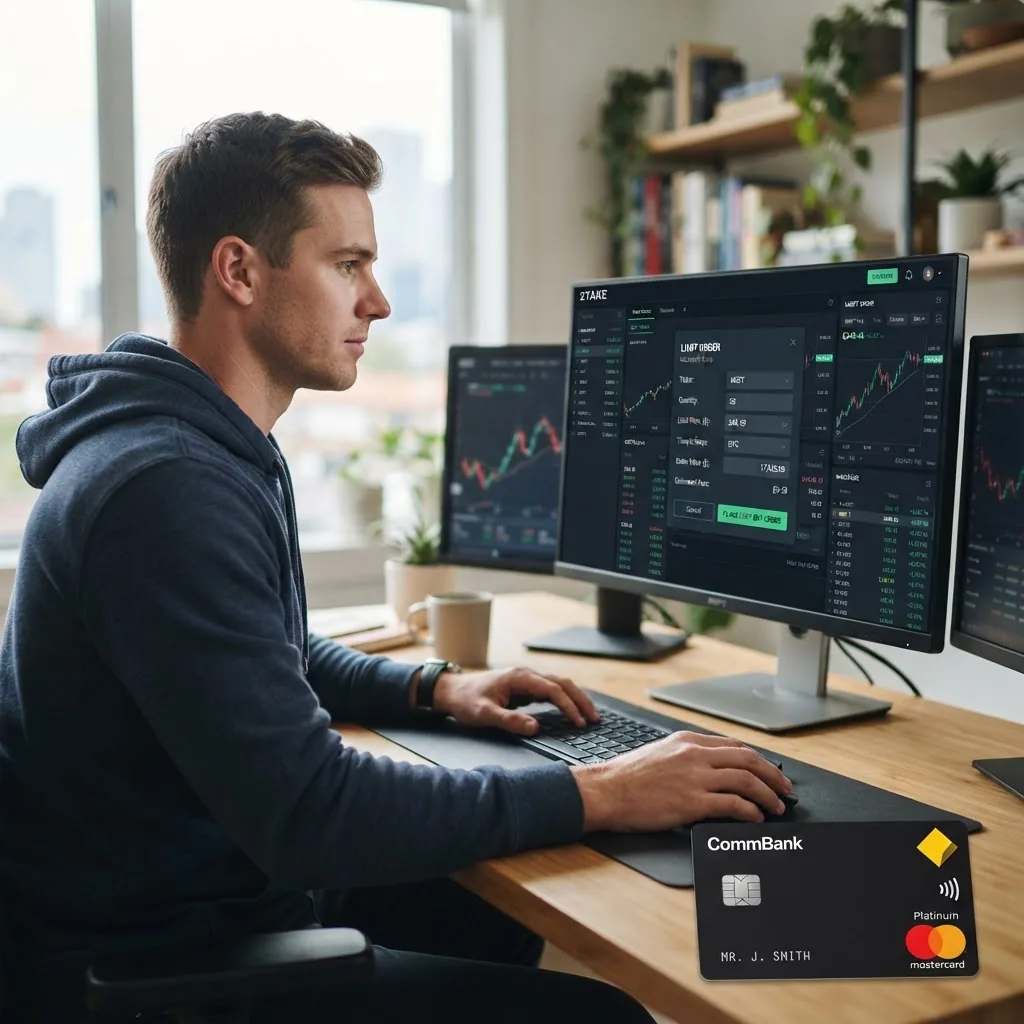
Take screenshots of the exact fields you will use and store them beside your trade plan document for reference.
-
Choose your first instruments — construct a 3–5 instrument starter portfolio with numeric rules
Use explicit allocation rules to avoid paralysis by choice. Example starter portfolios for $5,000 capital:
- Conservative beginner: 60% broad-market ETF (ASX), 25% bond ETF, 15% cash or high-interest savings. That means for $5,000: $3,000 ETF, $1,250 bond ETF, $750 cash.
- Balanced beginner: 50% ASX/Global equity ETFs, 20% US equity ETF, 20% ASX dividend ETF/REIT, 10% cash. For $5,000: $2,500, $1,000, $1,000, $500.
- Growth starter: 40% ASX large-cap ETF, 30% international ETF, 20% sector ETF (e.g., tech), 10% speculative single-stock or small-cap ETF. For $5,000: $2,000, $1,500, $1,000, $500.
Rules to follow:
- No single instrument > 40% of portfolio at the start.
- Keep at least 5%–10% in cash for opportunistic buys and to cover margin if you ever enable it.
- Limit per-trade fees impact: if fee = $9.50, avoid many small trades; consolidate purchases to reduce total fee drag. For example, on $500 trades, $9.50 is a 1.9% cost; on $2,500 trades it’s 0.38%.
Pick ticker symbols that match your allocation and write down purchase target prices and reason (index exposure, dividend yield, sector thesis). This keeps trades rule-based, not emotional.
-
Execute sample trades — two practical examples with exact numbers and calculations
Practice two trades: one market order and one limit order with stop-loss. Use these numeric examples.
Example A — Market order (ETF)
Scenario: buy ASX broad-market ETF currently bid/ask 50.00 / 50.05. You decide to buy $2,500 worth, with brokerage $9.50 flat.
- Order size in shares = floor(2,500 / 50.05) = floor(49.95) = 49 shares.
- Trade value = 49 × 50.05 = $2,452.45.
- Total cost = trade value + brokerage = $2,452.45 + $9.50 = $2,461.95.
- Cash remaining from $2,500 = $38.05 (keep this as buffer).
Why this matters: placing a market order on a low-liquidity instrument can fill at worse prices; the spread (ask-bid) of $0.05 represents slippage risk. For large orders, consider limit orders.
Example B — Limit buy with stop-loss (single stock)
Scenario: you target 100 shares of XYZ at $2.50. Brokerage = $9.50. You set a limit buy at $2.48 (GTC) and a stop-loss at $2.00 after purchase to contain downside.
- Planned cost if fully filled = 100 × $2.50 = $250.00 plus brokerage $9.50 = $259.50.
- Stop-loss trigger at $2.00: if hit, sale proceeds before fees = 100 × $2.00 = $200.00 minus brokerage (another $9.50) = $190.50 net — a realised loss of $69.00 or -26.6% from $259.50 purchase.
- Position sizing rule: risk per trade capped at 2% of portfolio. For a $5,000 portfolio, 2% = $100. This stop-loss exceeds desired risk; reduce quantity to 30 shares to limit risk: 30 × $2.50 = $75.00 + $9.50 = $84.50 cost. If stop at $2.00, net proceeds 30×2.00−9.50 = $50.50; loss = $34.00 ≈ 0.68% of portfolio.
Lesson: always calculate the worst-case loss including round-trip fees and compare to your per-trade risk rule (e.g., 1–2% of portfolio).
-
Set orders with time-in-force and re-check numbers — use numeric limits, avoid market shocks
When submitting orders set explicit Time-In-Force (TIF): Day (expires end of trading day) or GTC (good ’til cancelled, usually 30–90 days). Use GTC only for long-term limit entries and set an internal review date every 30 days.
Before finalising an order verify:
- Quantity and order type — rounding errors from fractional shares matter on ASX (fractional shares usually not supported outside ETFs on many platforms).
- Estimated fees — platforms show fees; confirm fixed brokerage and exchange fees. Example exchange fees: $0.01–$0.30 per share sometimes applied by exchanges and clearing houses on top of brokerage (platform will display final estimate).
- Available cash vs required cash including fees — do not rely on promised credit; keep a $50 buffer per trade for unexpected fees.
-
Use platform tools to research and screen — build reusable scans with exact filters
Take 1–2 hours to create three reusable screeners that match your strategy. Examples and exact filters:
- Value screener: P/E between 8 and 15, dividend yield > 3.5%, market cap > $500M, 6-month average volume > 100k shares.
- Growth screener: Revenue growth YoY > 15% (last 2 reported periods), EPS growth forecast > 10%, analyst coverage > 5.
- Defensive screener: Beta < 0.9, 5-year debt/equity < 0.6, dividend coverage ratio > 1.2, current ratio > 1.5.
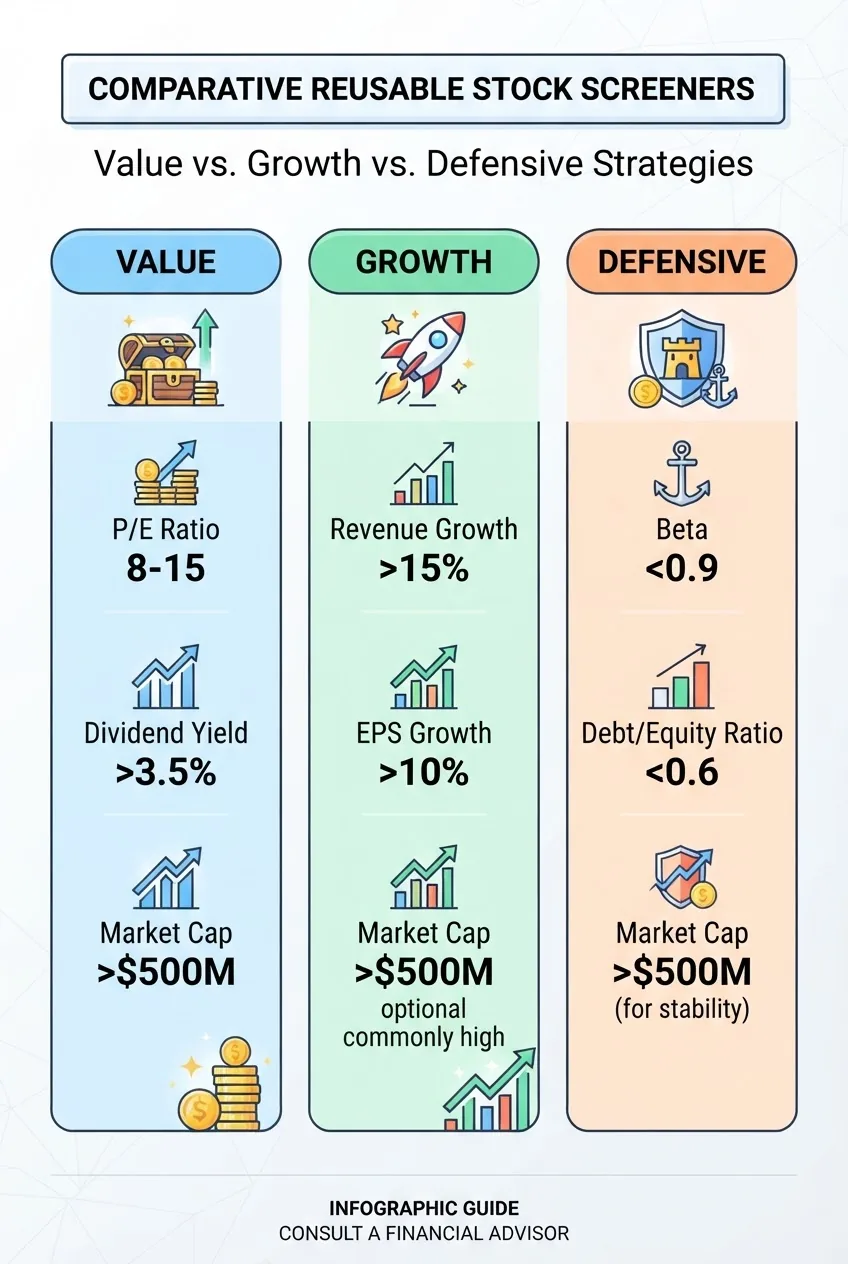
Export or bookmark these screeners. Re-run them weekly to generate a watchlist of 5–15 instruments; then narrow to 1–3 candidates for action each month.
-
Set alerts and monitoring rules — automated price and fundamental alerts
Spend 30–45 minutes automating alerts. Configure:
- Price alerts: set +/− 5% and +/− 15% thresholds to remind you to revisit positions.
- Trailing stop alerts: set trailing stop to 7% for growth positions or 12% for volatile small-caps; test using a demo first.
- Fundamental change alerts: dividend declaration, earnings release date and >10% change in analyst consensus price target.
- Daily summary: receive an end-of-day account summary at 18:30 AEST (or your local time).
Use email for long-form alerts and mobile push for immediate trade-significant events. For example, an overnight US-market move over 5% should trigger a mobile push immediately on open next local day.
-
Tax and record-keeping — configure tax settings and export workflows
Accounting and tax are clerical but critical. Do these exact steps:
- Provide TFN to avoid pay-as-you-go withholding on dividends. If you do not have a TFN, note potential higher withholding and set a calendar reminder to apply for TFN immediately.
- Enable dividend reinvestment plan (DRP) preferences if you want automatic reinvestment; otherwise choose cash dividend.
- Set up a folder in your cloud storage labelled “Investments/YYYY” and export monthly CSV trade reports from the platform. Fields to keep: trade date, instrument, buy/sell, quantity, price, fees, brokerage, net amount, and settled date.
- Reconcile trades quarterly. Keep scanned copies of all trade confirmations and dividend statements for 5 years (ATO requirement if audited).
For CGT calculations: track cost base adjustments for any corporate actions (splits, consolidations, DRP reinvestments). Example: if you bought 100 shares at $10 and later had a 2-for-1 split, record post-split cost per share $5 and quantity 200.
When unsure about tax treatment for complex products (CFDs, options), plan to consult a tax adviser — see “When to call a professional” below.
-
Rebalance and risk management — set numeric rebalance bands and schedules
Create a simple rule set and calendar reminders:
- Rebalance quarterly, or when any asset deviates by more than ±5 percentage points from target allocation.
- Transaction cost rule: avoid rebalancing if the rebalance incurs brokerage > 0.5% of the rebalanced amount; instead use the next month’s contribution to rebalance gradually.
- Loss stop policy: if a single instrument falls >30% from purchase within 90 days and no company-specific event justifies holding, reduce position to half within 14 days or review fundamentals within 48 hours.
- Use tax-loss harvesting in the final quarter if you need losses to offset gains; document replacement purchases to avoid wash-sale-style issues for CGT timing.
Record rebalancing trades as planned entries in a spreadsheet with exact quantities, fees and expected tax consequences.
-
Advanced tools — APIs, margin, and derivatives (use numeric limits and staged exposure)
If you plan to use advanced features, proceed in stages and lock numeric exposure limits:
- API trading: start with read-only keys to pull data. If you enable trading keys, limit them to $500 max trade size and create a sandbox test script that places and cancels orders 10 times on demo accounts to validate logic.
- Margin lending: set a maximum portfolio collateral utilisation of 20% to start. Example: portfolio $20,000, maximum margin borrowed = $4,000. If platform margin rate = 7.5% p.a., calculate interest cost: $4,000×7.5% = $300 per year; ensure expected return covers interest and tax.
- CFDs and options: cap notional exposure to 10% of portfolio when starting. CFDs typically use leverage; a 5:1 leverage increases risk — limit notional to $1,000 for a $5,000 portfolio in your first month and review results after 30 days.
Many investors lose capital quickly when combining margin with options or CFDs. Only proceed after 90 days of successful simulated trades and documented outcomes.
-
Mobile vs desktop and multi-device workflow — set a primary device and backup routines
Decide which device you will use as primary for trade confirmations. My recommendation from practitioner experience: use desktop for research and order placement for the first 3 months; use mobile only for monitoring and confirmations.
Set these exact rules:
- Primary device: desktop; always capture a screenshot of order confirmation and save it to cloud in folder “Investments/Confirmations/YYYY-MM”.
- Backup device: smartphone with push notifications and biometrics enabled. Use mobile only for quick market-exit actions requiring speed < 5 minutes.
- Log out from shared/public computers immediately and disable “remember me”.
-
Ongoing education and review — commit to measurable goals and learning targets
Set a 90-day plan with measurable outcomes:
- Week 1–4: complete demo trades and place at least two live trades totalling ≥ $1,000 to understand fees and settlement.
- Week 5–12: build a watchlist of 15 instruments and execute one rebalancing event; track realised vs expected performance monthly.
- End of 90 days: document lessons, update allocation rules, and decide whether to expand market access (e.g., add US ETFs) with a planned $1,000 incremental funding.
Link reading: once you understand account operations, deepen fundamental investing knowledge via our How to Invest in Stocks Guide for Beginners.
-
Close or migrate accounts safely — steps to consolidate or close when needed
If you choose to close or move platforms, follow a numeric checklist to avoid tax surprises:
- Sell or transfer out shareholdings: request an in-specie transfer if supported (no sale, hence no CGT event if your new platform accepts holdings). Confirm transfer fees — typical transfer-out fees range $0–$30; obtain exact quoted fee in writing.
- Withdraw cash: confirm withdrawal cut-off times (e.g., 15:00 AEST for same-day processing). Make a small test withdrawal of $50 before moving larger amounts.
- Download complete account history CSV and all confirmations; keep them for 7 years per ATO guidance for any tax audits.
Common mistakes and how to avoid them
I have watched people — myself included early on — lose money by repeating the same avoidable errors. Below I describe the mistakes and the exact, concrete fixes I adopted.
- I traded too small, then fees ate returns. Early on I put $100 into many stocks and paid $9.50 per trade; my break-even required a 9.5% move just to cover brokerage. Fix: consolidate buys to minimum $500–$1,000 per trade or choose a platform with zero-commission ETFs for small allocations.
- I ignored settlement timing and tried to withdraw immediately. I once sold shares and requested withdrawal before the T+2 settlement; the platform rejected the withdrawal and imposed an extra fee on a manual override. Fix: always plan around T+2 settlement and keep a $200 buffer for liquidity needs.
- I used margin without testing my pain points. I enabled margin for a small position; a 10% adverse move triggered a margin call and forced sale at poor prices. Fix: set maximum margin utilisation to 20% and use alerts for maintenance margin at 40% utilisation.
- I placed market orders on illiquid stocks at open. One trade filled at 15% worse than the quoted price due to wide spreads at open. Fix: use limit orders or wait for liquidity (after the first 15–30 minutes of trading) and check 6-month average daily volume (min 100k shares for single-stock trades).
- I used the mobile app for complex order types. I once set an unintended order type because the mobile layout hid the TIF field. Fix: use desktop for multi-field orders and always review the order confirmation screenshot before confirming.
Compact checklist before you press execute
- Account funded and TFN provided or TFN application started.
- 2FA enabled and recovery codes stored in password manager.
- Order quantity, limit/stop prices, TIF and estimated fees recorded in trade plan.
- Trade size respects your rule: no single trade > 5–10% of portfolio unless part of planned rebalancing.
- Cash buffer of at least $50–$200 retained for each trade to cover unexpected fees or shortfalls.
- Screener or watchlist reviewed within the last 7 days and fundamental checks completed.
- Tax and record folder exists and monthly CSV export scheduled.
When to call in a professional
Call a licensed financial adviser or tax professional when any of the following apply to you:
- You’re planning to borrow more than 20% of your portfolio in margin funding or considering gearing strategies.
- Your portfolio will exceed $100,000 and you require tax optimisation strategies like negatively geared investments or advanced CGT planning.
- You need personalised retirement income modelling or to integrate investments with superannuation and estate planning.
- You trade complex derivatives (options, futures, CFDs) with exposure > 10% of your net assets.
For a first consultation questions list: bring exact account statements, trade history CSV for the last 12 months, and a clear target (e.g., “grow to $100k in 10 years with maximum 8% volatility”). This lets advisers provide specific numerical advice.
Practical appendix — quick reference numbers and settings
Keep this section as a quick look-up in your trade plan document.
- ASX trading hours: 10:00–16:00 AEST (standard sessions). Pre-market/after-hours may be available depending on platform — proceed cautiously.
- Settlement: ASX T+2 (trade date + 2 business days).
- Rule-of-thumb position sizing: risk per trade 1–2% of portfolio. To compute quantity: Q = floor((PortfolioValue × RiskPercent) / (EntryPrice − StopPrice)).
- Brokerage examples commonly seen: $0 (zero-commission ETFs on some platforms), $6.95, $9.50, $19.95 flat; always calculate per-trade percentage (Fee / TradeValue × 100).
- Currency conversion for US trades: typical retail FX conversion 0.2%–0.5% per transaction; incorporate that into total trade cost.
Further reading and internal links
Expand your financial foundation with these targeted articles: How to Invest in Stocks Guide for Beginners for equity basics, and our Investment Accounts for Beginners Guide for account type comparisons. For budgeting context when building investment capital, see the Personal Finance Tips and Money Management Advice Guide.
Frequently Asked Questions
What are online investment platforms and how do they differ?
Online investment platforms are web or app-based services that let individuals buy, sell and hold investment products: shares, ETFs, bonds and sometimes derivatives. They differ by market access, fees (flat vs percentage), tools (charting, API), settlement processes and account types (cash accounts, margin, superannuation).
How much money do I need to start using online investment platforms?
You can start with as little as $100 on some platforms, but I recommend at least $1,000 to avoid excessive relative fee drag; $5,000 is ideal to build a diversified 3–5 instrument starter portfolio and keep per-trade fees below 1% of trade size.
What fees should I look for and how do they affect returns?
Look for flat brokerage per trade (e.g., $9.50) and percentage fees for currency conversions (0.2%–0.5%). Calculate fee impact: $9.50 on a $500 trade equals 1.9% cost. Always include exchange fees, FX, and platform subscription fees when modelling returns.
Which order types should a beginner use first?
Beginners should use limit orders and market orders initially: market orders for immediate fills in highly liquid ETFs; limit orders to control entry price on individual stocks. Add stop-loss orders once you implement explicit position-sizing rules to protect downside.
Are online investment platforms safe — how do I protect myself?
They can be safe if you use strong passwords, an authenticator app for 2FA, withdrawal account whitelisting, and a hardware key if supported. Keep recovery codes offline and export monthly trade reports for tax and audit trails.
How are my tax obligations handled when using an online platform?
Platforms report dividends and disposals; provide annual tax statements. Supply your TFN to avoid withholding tax. Keep exported trade CSVs and track cost base adjustments for DRPs and corporate actions for accurate CGT reporting.